ASCII Field Maps
The asciimap field plugin loads a measured field map from
a plain-text file. It is the GEMC3 successor of the clas12 asciiField, with the two responsibilities
split apart:
- the definition (symmetry, grid, units, interpolation, placement) lives in YAML, like any other
gfieldsplugin; - the map file holds only data rows — the coordinate columns followed by the field components — with no embedded header.
Select it with type: asciimap (which resolves to the gfieldasciimapFactory plugin shipped with
GEMC):
gfields:
  - name: solenoid
    type: asciimap
    symmetry: cylindrical-z
    map: solenoid_map.txt
    field_unit: T
    coordinate1: "transverse,   601,  0*m, 3*m"
    coordinate2: "longitudinal, 1201, -3*m, 3*m"
Supported symmetries
symmetry |
Coordinates (in column order) | Field columns |
|---|---|---|
dipole-x, dipole-y, dipole-z |
longitudinal, transverse |
1 (on-axis) |
cylindrical-x, cylindrical-y, cylindrical-z |
transverse, longitudinal |
2 (Bt, Bl) |
phi-segmented |
azimuthal, transverse, longitudinal |
3 (Bx, By, Bz) |
cartesian_3D, cartesian_3D_quadrant |
X, Y, Z |
3 (Bx, By, Bz) |
The _quadrant cartesian variant stores only the first quadrant (x ≥ 0, y ≥ 0) and mirrors it.
Defining the grid
Each grid axis is one scalar coordinate<n> string with four comma-separated fields:
coordinate1: "name, npoints, min, max"
nameis one of the coordinate names for the chosen symmetry (see the table above).npointsis the number of grid points on that axis.min/maxare Geant4-number expressions with units (e.g.0*m,30*deg). That unit also sets the unit of the matching coordinate column in the map file, so the bulk data stays unit-free.
coordinate3 is required only for the 3D symmetries. The column order in the map file follows
coordinate1, coordinate2, coordinate3.
The map file
A data-only file: comment lines start with #, every other line is one grid point listing the
coordinate columns first, then the field components. Rows may appear in any order — each row’s
grid index is computed from its coordinates and validated against the declared grid.
# transverse[m]  longitudinal[m]  Bt[T]  Bl[T]
0.000  -3.000   0.000000   0.005970
0.000  -2.995   0.000000   0.006010
...
Map keys
| Key | Default | Meaning |
|---|---|---|
symmetry |
(required) | One of the symmetries above |
map |
(required) | Map file name (or path) |
coordinate1, coordinate2, coordinate3 |
(required) | Grid axes, "name, npoints, min, max" |
field_unit |
gauss |
Unit of the field columns in the map file |
scale |
1 |
Dimensionless multiplier applied to every field value |
interpolation |
linear |
linear or none (nearest neighbour) |
dir |
(next to the YAML) | Directory holding the map (see resolution below) |
vx, vy, vz |
0 |
Map displacement: subtracted from the query point before lookup |
rx, ry, rz |
0*deg |
Map rotation applied to the returned field vector |
integration_stepper and minimum_step are the usual
common keys.
Where the map file is found
When map is a bare file name (no /), it is looked up in this order:
- the explicit
dirparameter, if given; - the directory of the YAML file that defined the field — so a plain
.yamlworks whether it is run from its own directory or referenced by an absolute path; - the
fieldsdirectory installed next to the plugin.
A map value containing a / is used as an explicit path.
Migrating a legacy clas12 map
The legacy asciiField embedded an XML <mfield> header at the top of the map file. In GEMC3 that
header becomes the YAML definition and the map file keeps only its data rows:
| Legacy XML | GEMC3 YAML |
|---|---|
<symmetry type="cylindrical-z" .../> |
symmetry: cylindrical-z |
<first name="transverse" npoints="601" min="0" max="3" units="m"/> |
coordinate1: "transverse, 601, 0*m, 3*m" |
<field unit="T"/> |
field_unit: T |
<interpolation type="none"/> |
interpolation: none |
integration="ClassicalRK4" minStep="1*mm" |
integration_stepper: G4ClassicalRK4, minimum_step: 1*mm |
Runnable cylindrical (solenoid.yaml) and phi-segmented (torus.yaml) examples ship with GEMC under
the examples/fields/ directory.
Torus example
The torus example uses symmetry: phi-segmented with azimuthal, transverse, and longitudinal grid
coordinates. The map stores four azimuthal planes over one 30 degree sector; GEMC mirrors the
periodic sectors when the field is queried.
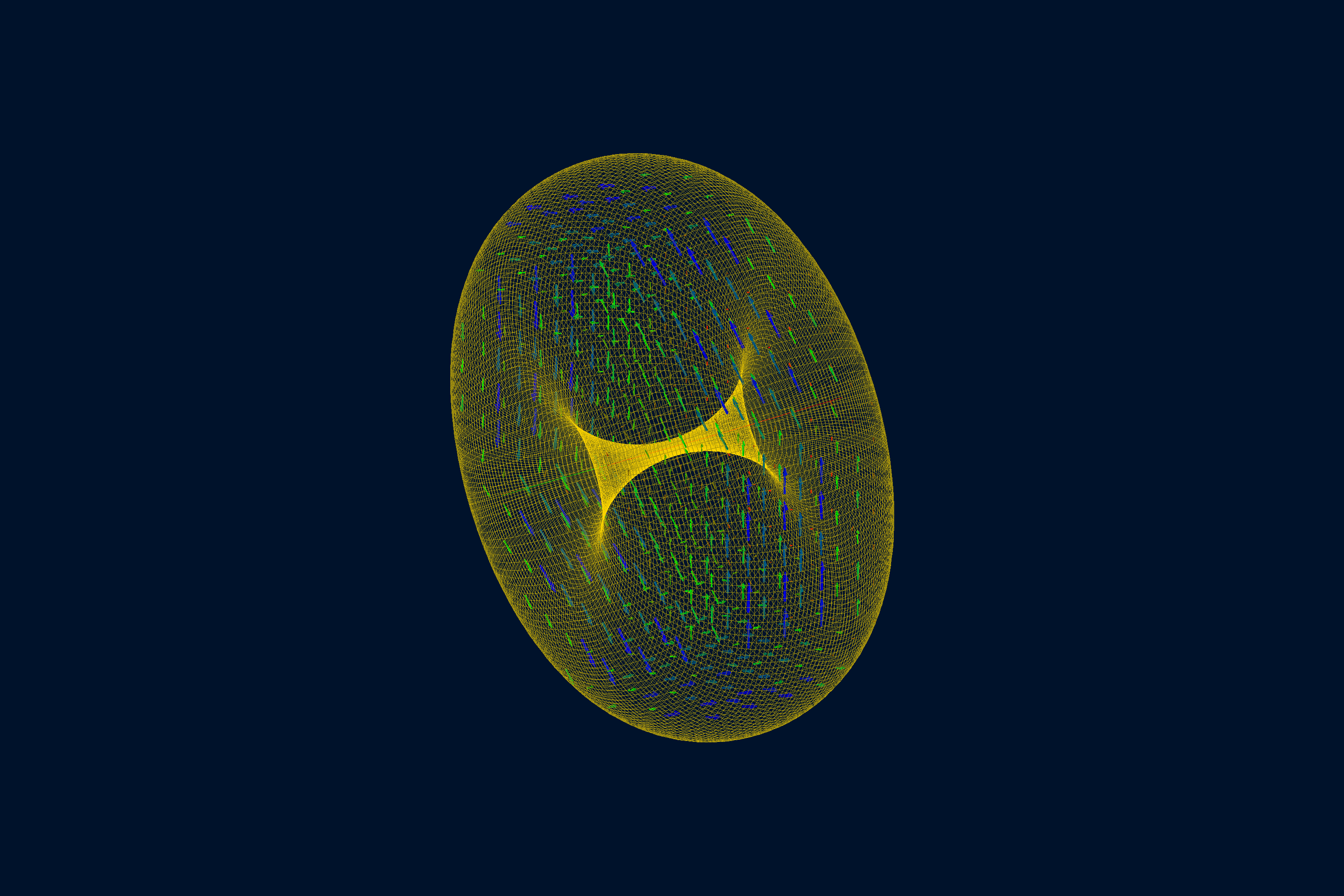
Querying the map
Like any field, an ASCII map can be evaluated without a full simulation (see Querying a field):
gemc solenoid.yaml -fieldAt="1*m 0*m 0*m"
gemc torus.yaml    -fieldAt="250*cm 0*cm 350*cm"