Loading...
Searching...
No Matches
gboard_example.cc File Reference
Example program showing how to route Geant4 output into a GBoard widget. More...
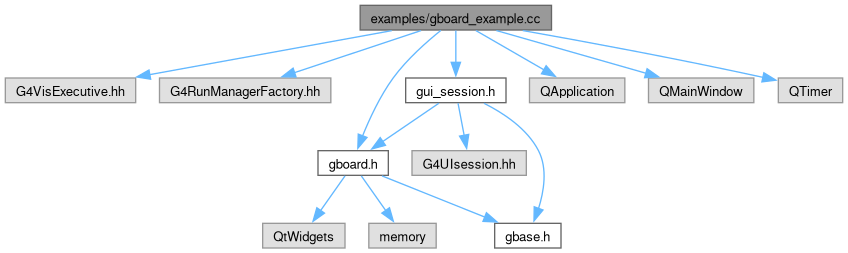
#include "G4VisExecutive.hh"#include "G4RunManagerFactory.hh"#include "gboard.h"#include "gui_session.h"#include <QApplication>#include <QMainWindow>#include <QTimer>
Include dependency graph for gboard_example.cc:
Go to the source code of this file.
Functions | |
| int | main (int argc, char *argv[]) |
| Entry point for the gboard example application. | |
Detailed Description
This example demonstrates two modes:
- GUI mode (enabled with
--gui): creates aQApplication, shows aQMainWindowcontaining GBoard, and installs a GUI_Session so Geant4 output is forwarded to the board. - CLI mode (default): runs without creating Qt objects and simply exits after setup messages.
The example also supports a timeout (scalar option tt) that automatically quits the Qt event loop after the specified duration.
Key behaviors illustrated:
- Creating module options via
gboard::defineOptions(). - Constructing a GBoard owned by the Qt parent (the main window).
- Creating a GUI_Session that forwards Geant4 output to the board (session does not own the board).
- Running and terminating a Qt event loop using
QTimer.
Definition in file gboard_example.cc.
Function Documentation
◆ main()
| int main | ( | int | argc, |
| char * | argv[] ) |
Responsibilities:
- Initializes options and logging.
- Optionally initializes Qt GUI objects and shows a window that embeds GBoard.
- Initializes a Geant4 visualization manager to ensure Geant4 subsystems are active for the demo.
- In GUI mode, installs GUI_Session to route Geant4 UI output to the board.
- Exits either after the Qt event loop ends (GUI) or immediately (CLI).
- Parameters
-
argc Standard C/C++ argument count. argv Standard C/C++ argument vector.
- Returns
EXIT_SUCCESSon normal completion, otherwise a non-zero status.
Definition at line 47 of file gboard_example.cc.