To see a list of the available Geant4 constructors:
gemc -showPhysics
Generator
The default kinematics is a 3 GeV proton generated along the z-axis just before the target.
This is defined in the yaml file:
gparticle:-name:protonp:3000vz:-250
gparticle
The gparticle option allows to control the Geant4 particle gun.
For the complete list of parameter that can be passed to it: gemc help gparticle.
Some of them:
name: Particle name (mandatory), for example “proton”.
multiplicity: How many copies of this particle will be generated in each event.
notice that the copies are not identical if some additional parameters are specified,
for example delta_p, delta_theta.
p: Particle momentum.
delta_p: Particle momentum range, centered on p.
theta: Particle polar angle.
delta_theta: Particle polar angle range, centered on theta. D
phi: Particle azimuthal angle.
For example, to define a particle gun with one electron along z plus 1 proton at theta=30,phi=90 degrees, use
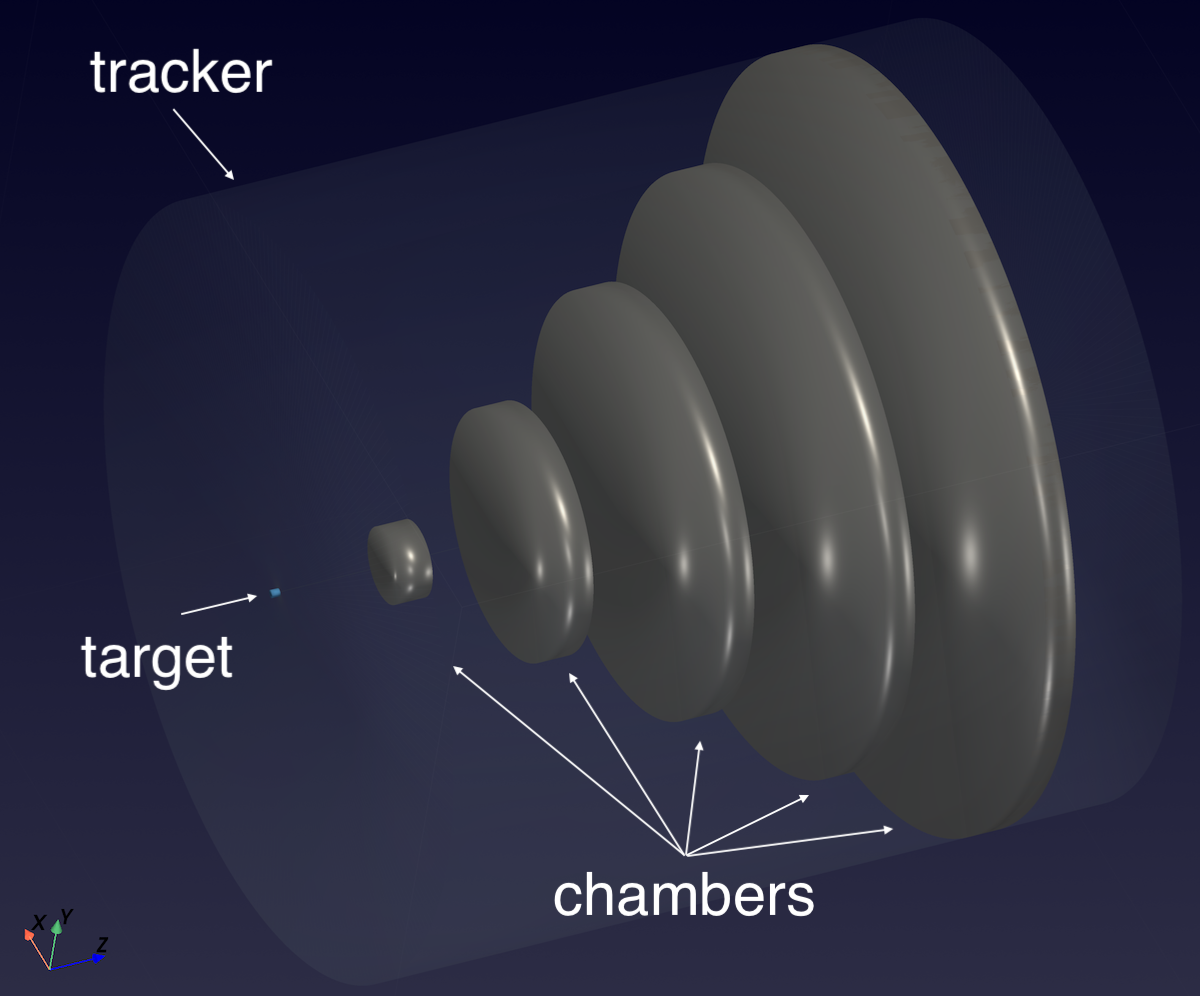
The chamber volumes are associated to the flux digitization (one of the available GEMC pre-built routines)
in geometry.py. The copyNo is used to discriminate them:
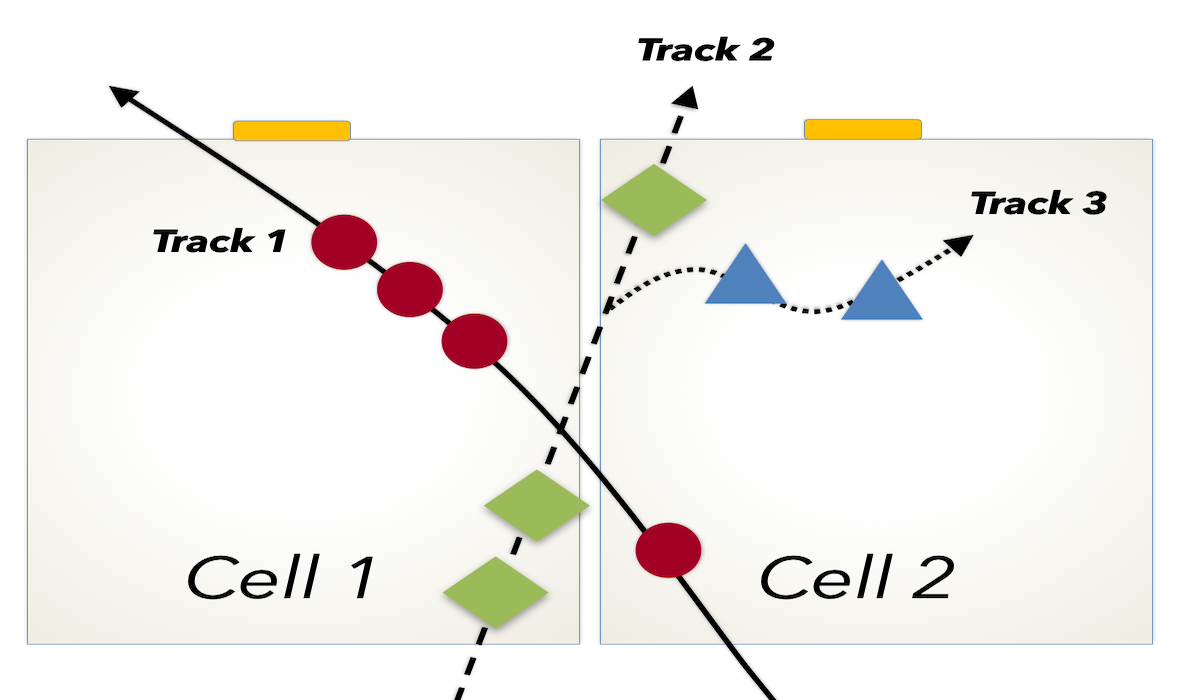
The flux digitization collects all G4Steps into hits by using the track id: all steps within a
sensitive element produced by the same track define a single hit. Different tracks’ steps in the
same sensitive element are collected in separate hits.
This digitization can be used to count and analyze the tracks passing through a volume.
Flux hit definition example: three tracks goes through two sensitive cells.
Track 1 creates two hits: < cell2, hit #1 > and < cell1, hit #1 >.
Track 2 creates two hits: < cell1, hit #2 > and < cell2, hit #2 >.
Track 3 creates one hit: < cell2, hit #3 >.
The variables stored in the digitized output are:
the sensitive element identifier, assigned by the user. For example
sector
layer
hitn: hit number
pid: particle id
tid: track id
E: track energy
time: time of the hit
totEdep: total energy deposited by the track
In this case, the identifier contains only one name: mychamber
In addition to the digitized variables, the true information is saved on the output stream.
True Information
The true information information is processed by GEMC and in certain instances
averaged (weighted by the energy deposition if present); in others,
like pid, tid or processName, the data come from the first step in the hit.
The complete list of variables are:
the sensitive element identifier, assigned by the user. For example
sector
layer
hitn: hit number
pid: particle id
tid: track id
avgTime: average time
avglx: average local x position
avgly: average local y position
avglz: average local z position
avgx: average global x position
avgy: average global y position
avgz: average global z position
totalEDeposited: total energy deposited
processName: process name creating the first step of this hit
Usage
Building the detector
Use the python script b2.py to build the detector. By default, the setup is stored in a SQLite file
name gemc.db. Various command line options can define the database type, variations and run number.
python API
Pass -h for additional command line options:
options:
  -h, --help            show this help message and exit
  -f, --factory FACTORY
						ascii, sqlite
  -v, --variation VARIATION
                        Set variation name
  -r, --run RUN         Set run number
  -sql, --dbhost DBHOST
                        SQLite filename or MYSQL host
  -pv, --pyvista        Show geometry using pyvista (needs pyvista)
  -pvb, --pvb, --pyvista-background
                        Use PyVista BackgroundPlotter (needs pyqt6 pyvistaqt)
  -pvw, --width WIDTH   Set plotter width
  -pvh, --height HEIGHT
						Set plotter height
  -pvx, --x X           Set plotter x position
  -pvy, --y Y           Set plotter y position
  -axes, --add_axes_at_zero
If you have pyvista (see also install pyvista),
you can use the -pv and -pvb options to display the setup without having to run GEMC
Running gemc
The file b2.yaml can be used to run the setup. Add -gui to run in interactively:
gemc b2.yaml -gui
Modify b2.yaml as needed, in particular to add particles, control the number of threads, modify the output etc.
Output Format
The gstreamer option is used to select the name and format of the output. Two simultaneous streams are selected,
ROOT and ASCII:
Since flux is a per event digitization, and events are distributed over threads, the output is also
gstreamer
The gstreamer option allows select the name and format of the output.
Run gemc help gstreamer to check its documentation:
-gstreamer=<sequence> ......: define a gstreamer output

• filename: name of output file. Default value: NODFLT
• format: format of output file. Default value: NODFLT
• type: type of output fileDefault value: event


Define output formats and filenames.
It can be used to select <events> or <frame> streams.
The file extension is added automatically based on the format.

Supported formats:

  - jlabsro
  - root
  - ascii
  - csv
  - json


Output types:

  - event: write events
  - stream: write frame time snapshots

Example that defines two gstreamer outputs:

 -gstreamer="[{format: root, filename: out}, {format: csv, filename: out}]"


The produced files structure depends on the accumulation method used:

  - event-based digitization (like <flux>) will have one file for every j
    thread, with "_tj" appended to the filename
  - run-based digitization (like <dosimeter>) will have one file only