CAD 示例
本示例使用 GEMC CAD 工厂导入三个 STL 器官网格,并模拟医学近距离放射治疗:将一个
铱-192 高剂量率(HDR)放射源置于肝脏内部,使其各向同性地发射光子。每个器官都是一个
flux 灵敏探测器,因此会按器官分别记录沉积能量;plot_dose.py 会将其换算为吸收剂量以及
等效的 Ir-192 照射时间。
快速开始
将示例复制到当前目录。要上传 CAD 定义、运行 200 个事例并生成 CSV 输出, 然后绘制各器官的剂量,请执行:
cp -r $GEMC_HOME/examples/basic/cad .
cd cad
./cad.py
gemc cad.yaml -n=200
./plot_dose.py
几何
几何在 stls/cad__default.yaml 中以声明式方式定义,并由 cad.py 上传到 gemc.db。
名为 stls 的 CAD 系统包含:
- heart_NIH3D,一个材料为血液的心脏网格。
- respiratory_NIH3D,一个材料为 G4_LUNG_ICRP 的半透明肺部网格。
- liver_NIH3D,一个材料为软组织的肝脏网格。
stls/cad__default.yaml 中的每个条目都设置了网格文件、材料、颜色、缩放比例、位置和标识符。
system 值必须同时与 cad.yaml 中的 gsystem 名称以及包含 STL 文件的目录名称一致。
三个器官的质心均位于 y 轴上(每个质心都满足 x = z = 0),并沿 y 轴堆叠排列。
肺部网格在建模时气管朝下,因此设置了绕 z 轴旋转 180° 的 rotation,使其恢复正立方向。
更多信息另见 CAD 导入文档。
交互式查看器:
物理过程列表
默认使用 FTFP_BERT,在 YAML 文件中通过 phys_list: FTFP_BERT 选定。
phys_list
The physics list can be selected using the option
gemc -phys_list <value>where
<value>can be a combination of the Geant4 physics constructors separated by the+sign. For examplegemc -phys_list="FTFP_BERT + G4NeutronCrossSectionXS"To see a list of the available Geant4 constructors:
gemc -showPhysics
发生器
粒子的运动学参数在 YAML 文件中定义:
gparticle:
  - name: gamma
    p: 380*keV
    delta_p: 120*keV
    multiplicity: 300
    theta: 90*deg
    delta_theta: 90*deg
    randomThetaModel: cosine
    phi: 180*deg
    delta_phi: 180*deg
    vx: 0*mm
    vy: -140*mm
    vz: 0*mm
    delta_vx: 20*mm
    delta_vy: 20*mm
    delta_vz: 20*mm
    randomVertexModel: sphere
这模拟了一个置入肝脏的临床 铱-192 HDR 近距离放射治疗源:
- 能量 —— Ir-192 发射线谱(主要谱线为 0.30–0.61 MeV)。此处用能量约为平均光子能量
0.38 MeV 的光子来近似,并用
delta_p展宽以覆盖该能谱。 - 位置 —— 产生顶点以肝脏质心的世界坐标
(0, -140, 0) mm为中心,在半径约为 35 mm 的球体内 均匀分布(randomVertexModel: sphere以|delta_v|作为半径),以模拟放射源的驻留区域。 各器官沿 y 轴堆叠(x = z = 0),心脏位于原点,肝脏紧邻其下方, 肺部位于其上方。 - 方向 —— 在 4π 立体角内各向同性发射:对 θ 在 0–180° 范围内进行
cosine采样,并结合 φ 在 0–360° 范围内的均匀采样。
更多信息另见 内部发生器文档。
数字化
每个器官在 stls/cad__default.yaml 中都配置为 flux 灵敏探测器:
defaults:
  digitization: flux

volumes:
  - name: heart_NIH3D
    identifier: "organ: 1"
采用 flux 数字化的探测器以 事例模式 工作:它为每个击中写入一行输出,每行都带有器官的 identifier 和沉积能量 totEdep。因此,单次运行就能分别统计三个器官的结果。
内置的 dosimeter 数字化同样可以计算剂量,但其探测器以 运行模式 工作, 会将灵敏探测器名称相同的所有击中累加到单条汇总记录中。 由于三个器官共用同一个
dosimeter名称,它们的结果会被合并为一个数值。 使用 flux 则可在每个击中记录中保留所属器官的标识。
吸收剂量
plot_dose.py 按器官对沉积能量求和,再除以器官质量以得到
吸收剂量:
其中求和遍历该器官的所有击中,\(\rho\) 是指定材料的密度
(gemc cad.yaml -printSystemsMaterials 报告血液、肺和软组织材料的密度分别为
1.06、1.04 和 1.03 g/cm³),\(V_{\text{mesh}}\) 是 CAD 网格体积(原始有符号体积 ×
各方向一致的缩放因子 scale³)。一戈瑞即每千克一焦耳,\(1\,\mathrm{Gy} = 1\,\mathrm{J/kg}\)。
照射时间
模拟会发射固定数量的光子;对应的 实际照射时间 是活度为 \(A\) 的 Ir-192 放射源 发射相同数量光子所需的时间。若光子产额为 \(Y\)(每次衰变产生的光子数), 则放射源每秒发射 \(R = A\,Y\) 个光子,因此对于 \(N_\gamma = N_{\text{events}} \times m\) 个模拟光子(每个事例的光子数为 \(m\)):
\[R = A \, Y, \qquad t_{\text{rad}} = \frac{N_\gamma}{A \, Y}\]plot_dose.py 默认采用标称 HDR 放射源,活度为 \(A = 10\ \mathrm{Ci} = 3.7\times10^{11}\) Bq,
每次 Ir-192 衰变的光子产额为 \(Y = 2.3\)(各伽马谱线强度之和);两者分别可通过
--activity 和 --yield 调整。由于剂量和 \(t_{\text{rad}}\) 都与
\(N_\gamma\) 成正比,单位治疗时间的吸收剂量(剂量率)为
\(D_{\text{organ}} / t_{\text{rad}}\),增大光子数
(等价于延长驻留时间)即可达到所需的全部治疗剂量。
更多信息见 剂量计文档。
用法
构建探测器
使用 Python 脚本 cad.py 上传 CAD 定义。该脚本读取
stls/cad__default.yaml,并将配置存储到名为 gemc.db 的 SQLite 文件中。
./cad.py
python API
Pass
-hfor additional command line options:options: -h, --help show this help message and exit -f, --factory FACTORY ascii, sqlite -v, --variation VARIATION Set variation name -r, --run RUN Set run number -sql, --dbhost DBHOST SQLite filename or MYSQL host -pv, --pyvista Show geometry using pyvista (needs pyvista) -pvb, --pvb, --pyvista-background Use PyVista BackgroundPlotter (needs pyqt6 pyvistaqt) -pvw, --width WIDTH Set plotter width -pvh, --height HEIGHT Set plotter height -pvx, --x X Set plotter x position -pvy, --y Y Set plotter y position -axes, --add_axes_at_zeroIf you have
pyvista(see also install pyvista), you can use the-pvand-pvboptions to display the setup without having to run GEMC
更多信息另见 构建几何。
运行 GEMC
可用 cad.yaml 文件运行此配置。添加 -gui 以交互方式运行:
gemc cad.yaml -gui
可按需修改 cad.yaml,尤其是添加粒子、控制线程数或
更改输出。
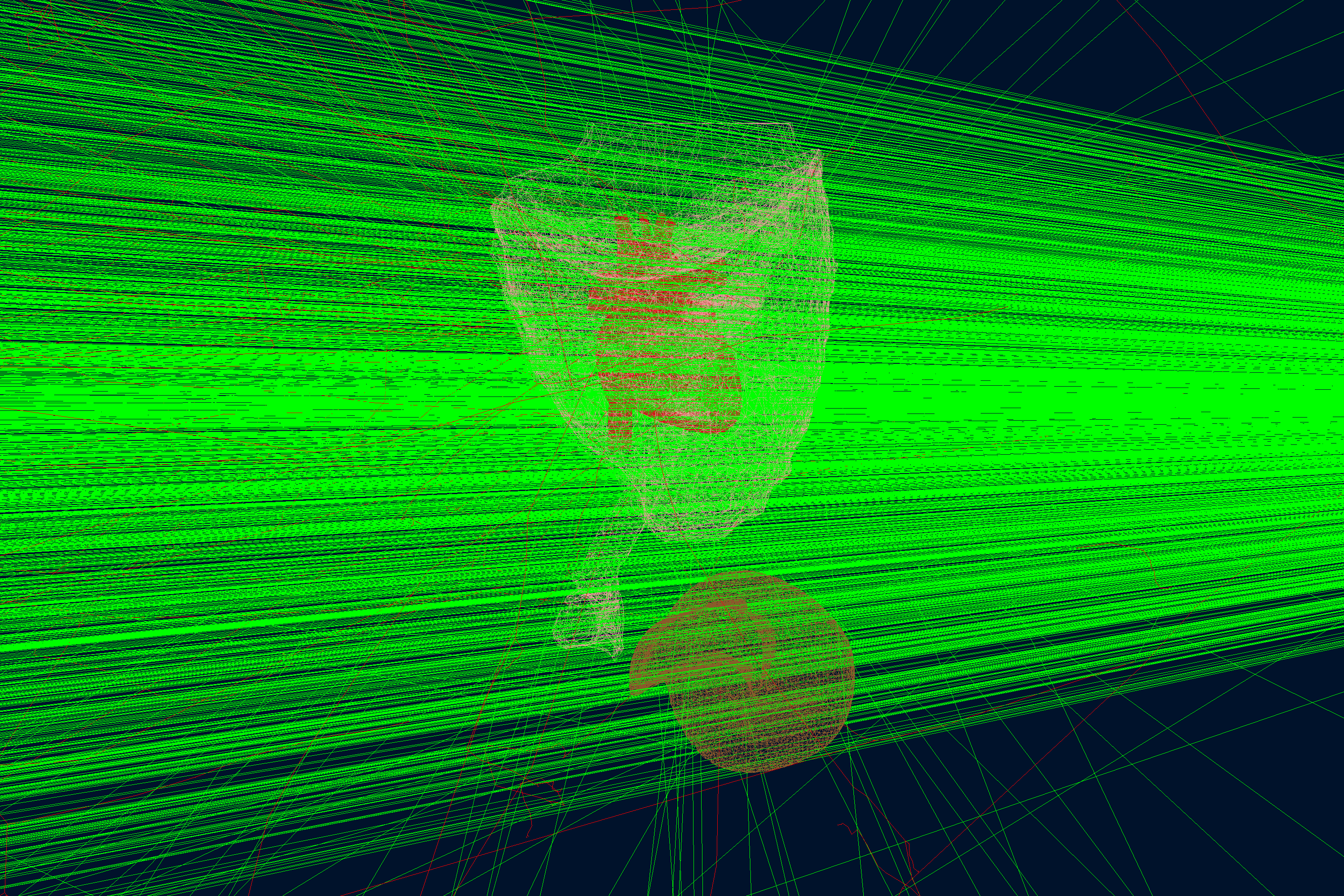
运行事例
输出
gstreamer 选项用于选择输出文件名和格式:
gstreamer:
  - format: csv
    filename: organs
gstreamer
The
gstreameroption selects the output name and format. Rungemc help gstreamerto check its documentation:-gstreamer=<sequence> ......: define a gstreamer output • filename: name of output file. Default value: NODFLT • format: format of output file. Default value: NODFLT • type: type of output fileDefault value: event Define output formats and filenames. It can be used to select <events> or <frame> streams. The file extension is added automatically based on the format. Supported formats: - root - ascii - csv - json Output types: - event: write events - stream: write frame time snapshots Example that defines two gstreamer outputs: -gstreamer="[{format: root, filename: out}, {format: csv, filename: out}]" The produced files structure depends on the accumulation method used: - event-based digitization (like <flux>) will have one file per thread, with "_t<thread#>" appended to the filename - run-based digitization (like <dosimeter>) will have one output file
更多信息另见 输出文档。
绘制各器官的剂量
先运行 GEMC 以写出 flux CSV 数据流(增加事例数可改善危及器官剂量结果的 统计精度):
gemc cad.yaml -n=200
然后用 plot_dose.py 绘制各器官的剂量。它会读取 organs_t0_digitized.csv,打印每个器官的
沉积能量、质量和剂量,并绘制柱状图:
./plot_dose.py                       # nominal 10 Ci Ir-192 source
./plot_dose.py --activity 5          # a weaker 5 Ci source (rescales the irradiation time)
./plot_dose.py --save organs_dose.png
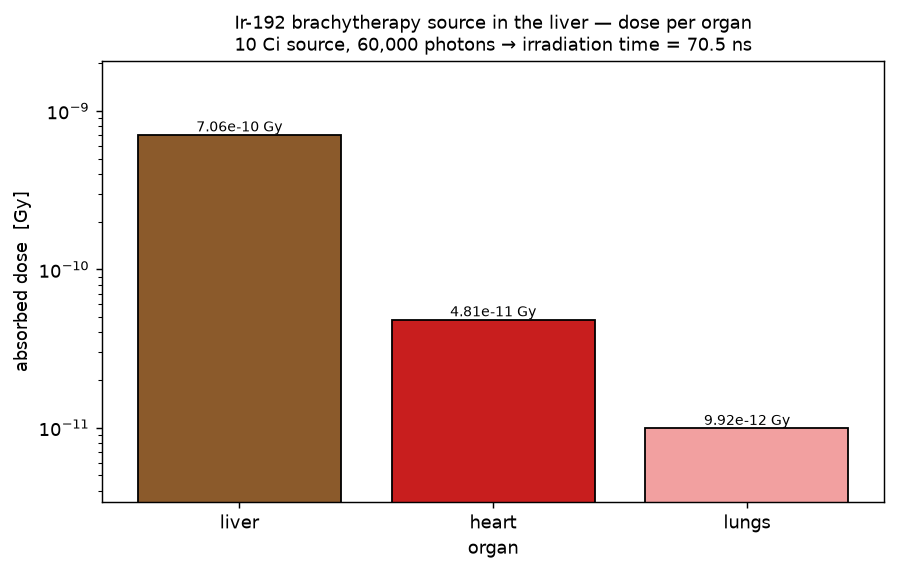
放射源所在的肝脏吸收的剂量远高于其他器官;紧邻其上方的心脏和位于堆叠顶部的肺部则受到小得多的 散射剂量——这种剂量集中于局部的特性正是近距离放射治疗的优势所在。标题显示了模拟光子数所对应的 Ir-192 照射时间(见上文 照射时间)。
使用 GEMC 分析器绘图
先用 200 个事例运行 GEMC。默认的 YAML 文件会写出分析器 CSV 数据流。
gemc cad.yaml -n=200
绘制每个击中沉积的总能量:
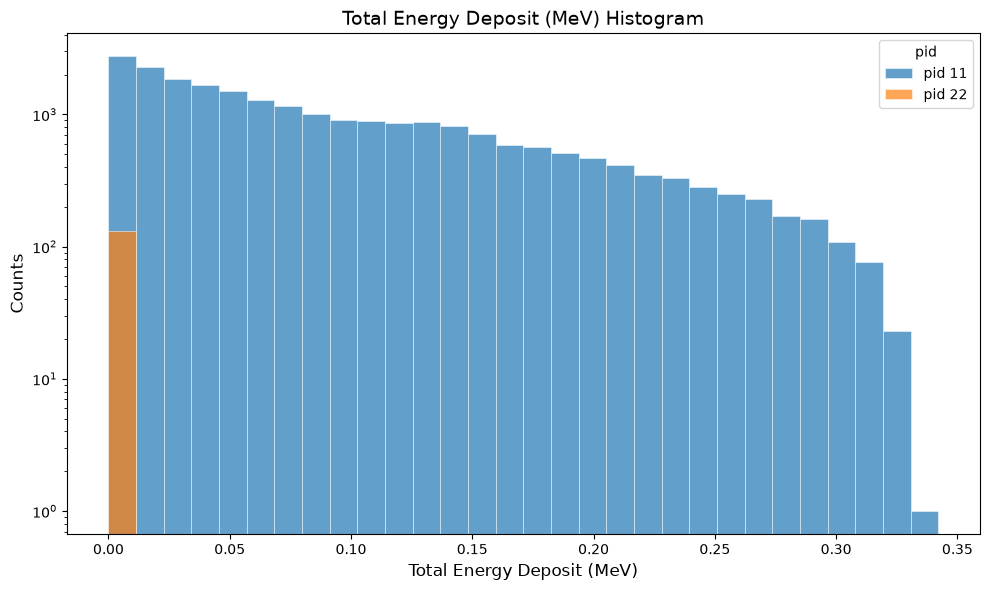
gemc-analyzer organs_t0_digitized.csv totEdep --kind csv