材料示例
本示例演示了在 GEMC 中定义材料的四种方式:使用 Geant4 内置材料、按原子数由元素组合材料、 按质量分数由现有材料组合材料,以及为闪烁或切伦科夫辐射添加光学属性。
你可以在浏览器中运行本示例:
快速上手
将示例复制到当前目录。 创建几何并运行 10 个事件:
cp -r $GEMC_HOME/examples/basic/material .
cd material
./materials.py
gemc materials.yaml -n=10
几何
几何在 materials.py 中定义。
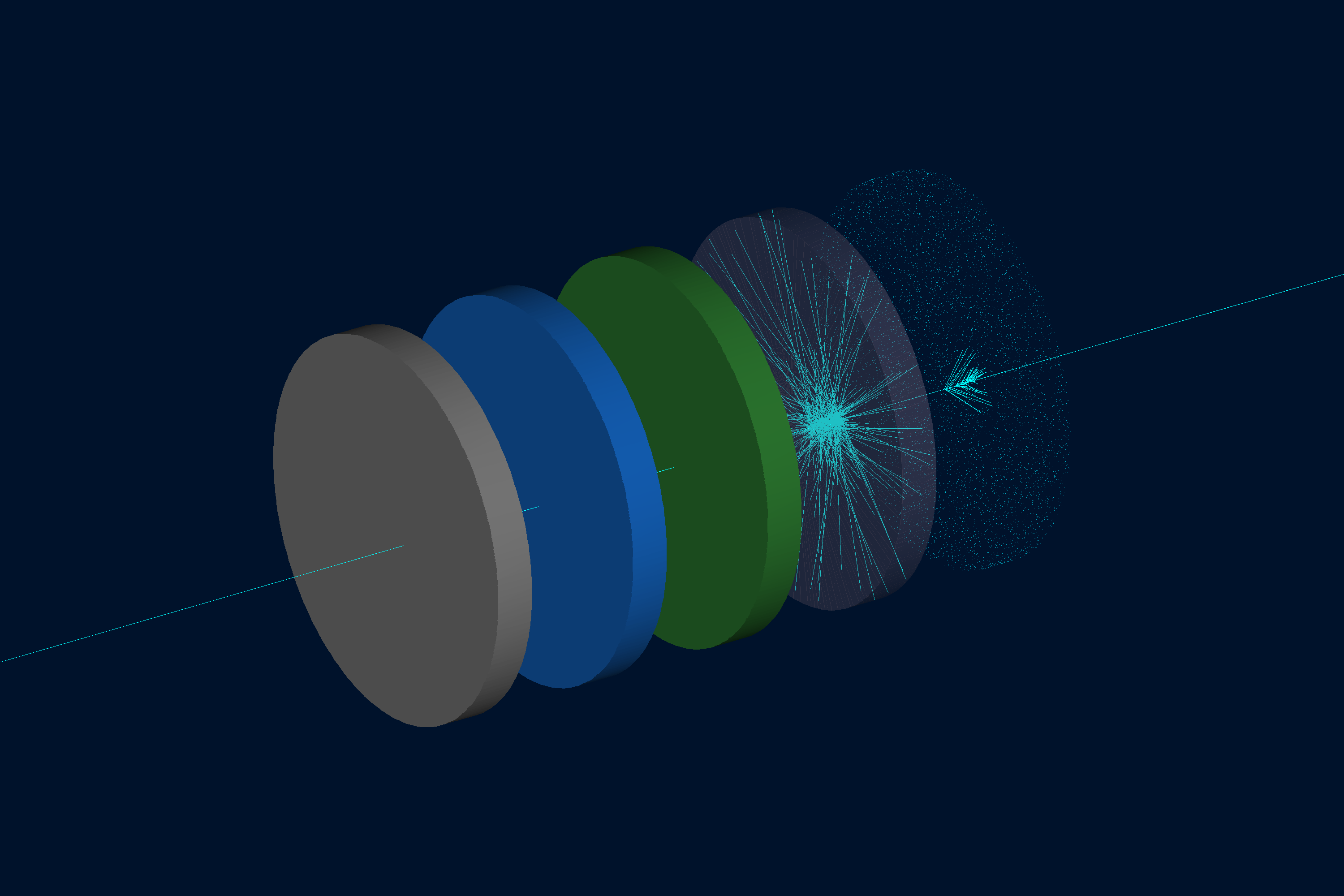
世界体(一个名为 root 的盒状几何体)包含沿 z 轴放置的五个相同的圆管。 所有圆管形状相同:直径 10 cm,厚 1 cm,从 z = 0 开始,彼此间隔 3 cm。 它们只在颜色和材料定义上有所不同:
| 圆管 | 几何体名称 | 材料 | 定义方法 |
|---|---|---|---|
| 1 | tube_carbon | G4_C | Geant4 内置(石墨) |
| 2 | tube_water | custom_water | 分子组成(H2O) |
| 3 | tube_mixture | air_water_mixture | 质量分数(80% 空气,20% 水) |
| 4 | tube_scintillator | my_scintillator | 具有闪烁属性的类 NaI 材料 |
| 5 | tube_optical | optical_glass | 具有折射率的 SiO2 |
交互式查看器:
材料定义
圆管 1 — Geant4 内置材料
最简单的情况:将
Geant4 材料数据库
中的名称直接赋给 gvolume.material:
tube1.material = "G4_C"
无需 GMaterial 对象;GEMC 会在运行时解析该名称。
圆管 2 — 分子组成
使用 GMaterial 和 addNAtoms 指定化学式中的原子及其数量:
water = GMaterial("custom_water")
water.description = "Water defined by molecular composition (H2O)"
water.density = 1.0          # g/cm3
water.addNAtoms("H", 2)
water.addNAtoms("O", 1)
water.publish(cfg)
原子总数必须大于 1。
圆管 3 — 质量分数
使用 addMaterialWithFractionalMass 按质量分数混合现有材料。
各质量分数之和必须恰好为 1:
mixture = GMaterial("air_water_mixture")
mixture.description = "80% air / 20% water mixture"
mixture.density = 0.9601     # g/cm3
mixture.addMaterialWithFractionalMass("G4_AIR",   0.80)
mixture.addMaterialWithFractionalMass("G4_WATER", 0.20)
mixture.publish(cfg)
圆管 4 — 闪烁属性
设置 photonEnergy 及各闪烁字段以启用光学光子发射。
所有随能量变化的量必须与 photonEnergy 具有相同数量的条目:
scintillator = GMaterial("my_scintillator")
scintillator.density = 3.67   # g/cm3
scintillator.addNAtoms("Na", 1)
scintillator.addNAtoms("I",  1)
scintillator.photonEnergy       = "2.0*eV 2.5*eV 3.0*eV 3.5*eV 4.0*eV"
scintillator.fastcomponent      = "1.0 0.9 0.8 0.7 0.6"
scintillator.slowcomponent      = "0.5 0.4 0.3 0.2 0.1"
scintillator.scintillationyield = 38000   # photons/MeV
scintillator.resolutionscale    = 1.0
scintillator.fasttimeconstant   = 6       # ns
scintillator.slowtimeconstant   = 88      # ns
scintillator.yieldratio         = 0.8
scintillator.birksConstant      = 0.00152
scintillator.publish(cfg)
圆管 5 — 折射率(切伦科夫)
设置 photonEnergy、indexOfRefraction,以及可选的 absorptionLength,
以在材料中启用切伦科夫辐射。这与
切伦科夫示例 中采用的方式一致:
optical_glass = GMaterial("optical_glass")
optical_glass.density = 2.5   # g/cm3
optical_glass.addNAtoms("Si", 1)
optical_glass.addNAtoms("O",  2)
optical_glass.photonEnergy      = "2.0*eV 3.0*eV 4.0*eV 5.0*eV"
optical_glass.indexOfRefraction = "1.458 1.466 1.476 1.490"
optical_glass.absorptionLength  = "3*m 3*m 3*m 3*m"
optical_glass.publish(cfg)
物理列表
在 YAML 文件中选择了 FTFP_BERT + G4OpticalPhysics,以便追踪来自闪烁和切伦科夫辐射的光学光子。
phys_list: FTFP_BERT + G4OpticalPhysics
phys_list
The physics list can be selected using the option
gemc -phys_list <value>where
<value>can be a combination of the Geant4 physics constructors separated by the+sign. For examplegemc -phys_list="FTFP_BERT + G4NeutronCrossSectionXS"To see a list of the available Geant4 constructors:
gemc -showPhysics
生成器
粒子的运动学参数在 YAML 文件中定义:
gparticle:
  - name: proton
    p: 2000*MeV
    vz: -2*cm
    delta_vx: 0.1*cm
    delta_vy: 0.1*cm
    multiplicity: 1
更多信息另见内部生成器文档。
用法
构建探测器
./materials.py
更多信息另见构建几何。
运行 GEMC
gemc materials.yaml -n=10
场景标注和装饰保存在 annotations.yaml 中。单独运行主 YAML 可获得简洁的视图,
或同时传入两个 YAML 文件以包含标签和比例尺装饰:
gemc materials.yaml -n=10
gemc materials.yaml annotations.yaml -n=10
添加 -gui 可交互式运行。
运行事件
输出
在 YAML 文件中配置了两个输出流:
gstreamer:
  - format: csv
    filename: material
更多信息另见输出文档。