Materials Example
This example demonstrates the four ways to define a material in GEMC: using a Geant4 built-in material, composing a material from elements by atom count, composing a material from existing materials by fractional mass, and adding optical properties for scintillation or Cherenkov radiation.
You can run this example in your browser: 
Quickstart
Copy the example to your current directory. To create the geometry and run 10 events:
cp -r $GEMC_HOME/examples/basic/material .
cd material
./materials.py
gemc materials.yaml -n=10
Geometry
The geometry is defined in materials.py.
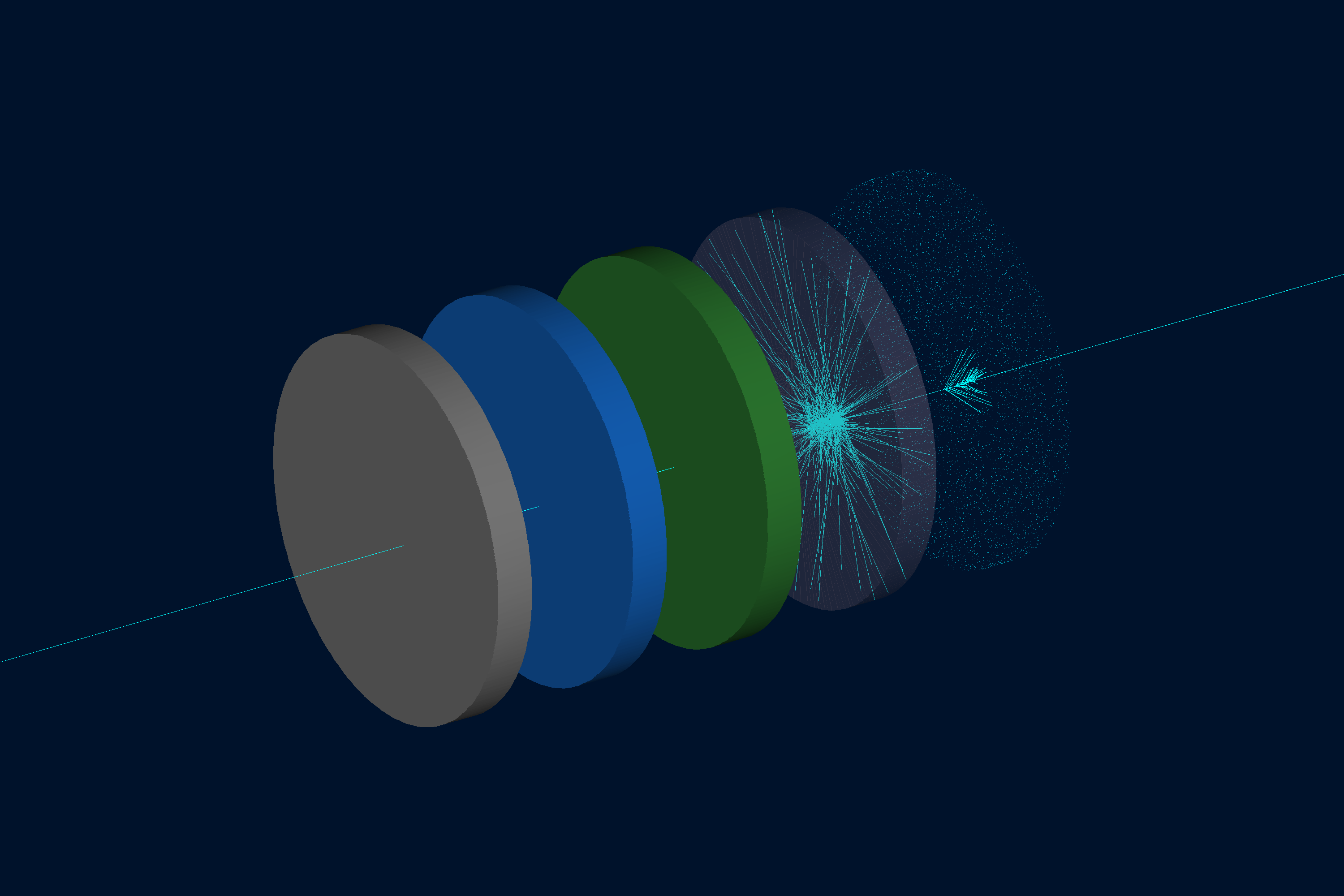
The world (a box named root) contains five identical tubes placed along the z-axis. All tubes share the same shape: 10 cm diameter, 1 cm thick, starting at z = 0 with a 3 cm gap between them. They differ only in color and material definition:
| Tube | Volume name | Material | Definition method |
|---|---|---|---|
| 1 | tube_carbon | G4_C | Geant4 built-in (graphite) |
| 2 | tube_water | custom_water | Molecular composition (H2O) |
| 3 | tube_mixture | air_water_mixture | Fractional masses (80% air, 20% water) |
| 4 | tube_scintillator | my_scintillator | NaI-like with scintillation properties |
| 5 | tube_optical | optical_glass | SiO2 with index of refraction |
Interactive viewer:
Material Definitions
Tube 1 — Geant4 built-in material
The simplest case: assign a name from the
Geant4 Material Database
directly to gvolume.material:
tube1.material = "G4_C"
No GMaterial object is needed; GEMC resolves the name at run time.
Tube 2 — Molecular composition
Use GMaterial and addNAtoms to specify atoms and their count in the chemical formula:
water = GMaterial("custom_water")
water.description = "Water defined by molecular composition (H2O)"
water.density = 1.0          # g/cm3
water.addNAtoms("H", 2)
water.addNAtoms("O", 1)
water.publish(cfg)
The total atom count must be greater than 1.
Tube 3 — Fractional masses
Use addMaterialWithFractionalMass to mix existing materials by weight fraction.
The fractions must sum to exactly 1:
mixture = GMaterial("air_water_mixture")
mixture.description = "80% air / 20% water mixture"
mixture.density = 0.9601     # g/cm3
mixture.addMaterialWithFractionalMass("G4_AIR",   0.80)
mixture.addMaterialWithFractionalMass("G4_WATER", 0.20)
mixture.publish(cfg)
Tube 4 — Scintillation properties
Set photonEnergy and the scintillation fields to enable optical photon emission.
All energy-dependent quantities must have the same number of entries as photonEnergy:
scintillator = GMaterial("my_scintillator")
scintillator.density = 3.67   # g/cm3
scintillator.addNAtoms("Na", 1)
scintillator.addNAtoms("I",  1)
scintillator.photonEnergy       = "2.0*eV 2.5*eV 3.0*eV 3.5*eV 4.0*eV"
scintillator.fastcomponent      = "1.0 0.9 0.8 0.7 0.6"
scintillator.slowcomponent      = "0.5 0.4 0.3 0.2 0.1"
scintillator.scintillationyield = 38000   # photons/MeV
scintillator.resolutionscale    = 1.0
scintillator.fasttimeconstant   = 6       # ns
scintillator.slowtimeconstant   = 88      # ns
scintillator.yieldratio         = 0.8
scintillator.birksConstant      = 0.00152
scintillator.publish(cfg)
Tube 5 — Index of refraction (Cherenkov)
Set photonEnergy, indexOfRefraction, and optionally absorptionLength to enable
Cherenkov radiation in the material. This mirrors the approach used in the
Cherenkov example:
optical_glass = GMaterial("optical_glass")
optical_glass.density = 2.5   # g/cm3
optical_glass.addNAtoms("Si", 1)
optical_glass.addNAtoms("O",  2)
optical_glass.photonEnergy      = "2.0*eV 3.0*eV 4.0*eV 5.0*eV"
optical_glass.indexOfRefraction = "1.458 1.466 1.476 1.490"
optical_glass.absorptionLength  = "3*m 3*m 3*m 3*m"
optical_glass.publish(cfg)
Physics List
FTFP_BERT + G4OpticalPhysics is selected in the YAML file so that optical photons from
scintillation and Cherenkov radiation are tracked.
phys_list: FTFP_BERT + G4OpticalPhysics
phys_list
The physics list can be selected using the option
gemc -phys_list <value>where
<value>can be a combination of the Geant4 physics constructors separated by the+sign. For examplegemc -phys_list="FTFP_BERT + G4NeutronCrossSectionXS"To see a list of the available Geant4 constructors:
gemc -showPhysics
Generator
The particle kinematics are defined in the YAML file:
gparticle:
  - name: proton
    p: 2000*MeV
    vz: -2*cm
    delta_vx: 0.1*cm
    delta_vy: 0.1*cm
    multiplicity: 1
See also the Internal Generator Documentation for more information.
Usage
Building the detector
./materials.py
See also the Building Geometry for more information.
Running GEMC
gemc materials.yaml -n=10
Scene annotations and decorations are kept in annotations.yaml. Run the main YAML by itself for an uncluttered view,
or pass both YAML files to include the labels and scale decoration:
gemc materials.yaml -n=10
gemc materials.yaml annotations.yaml -n=10
Add -gui to run interactively.
Running Events
Output
Two output streams are configured in the YAML file:
gstreamer:
  - format: csv
    filename: material
See also the Output Documentation for more information.