マテリアルの例
この例では、GEMC でマテリアルを定義する 4 つの方法を示します。Geant4 組み込みマテリアルを使う方法、 原子数を指定して元素からマテリアルを構成する方法、既存のマテリアルを質量分率で組み合わせる方法、そして シンチレーションやチェレンコフ放射のための光学特性を追加する方法です。
この例はブラウザ上で実行できます:
クイックスタート
例を現在のディレクトリにコピーします。 ジオメトリを作成して 10 イベントを実行するには:
cp -r $GEMC_HOME/examples/basic/material .
cd material
./materials.py
gemc materials.yaml -n=10
ジオメトリ
ジオメトリは materials.py で定義されています。
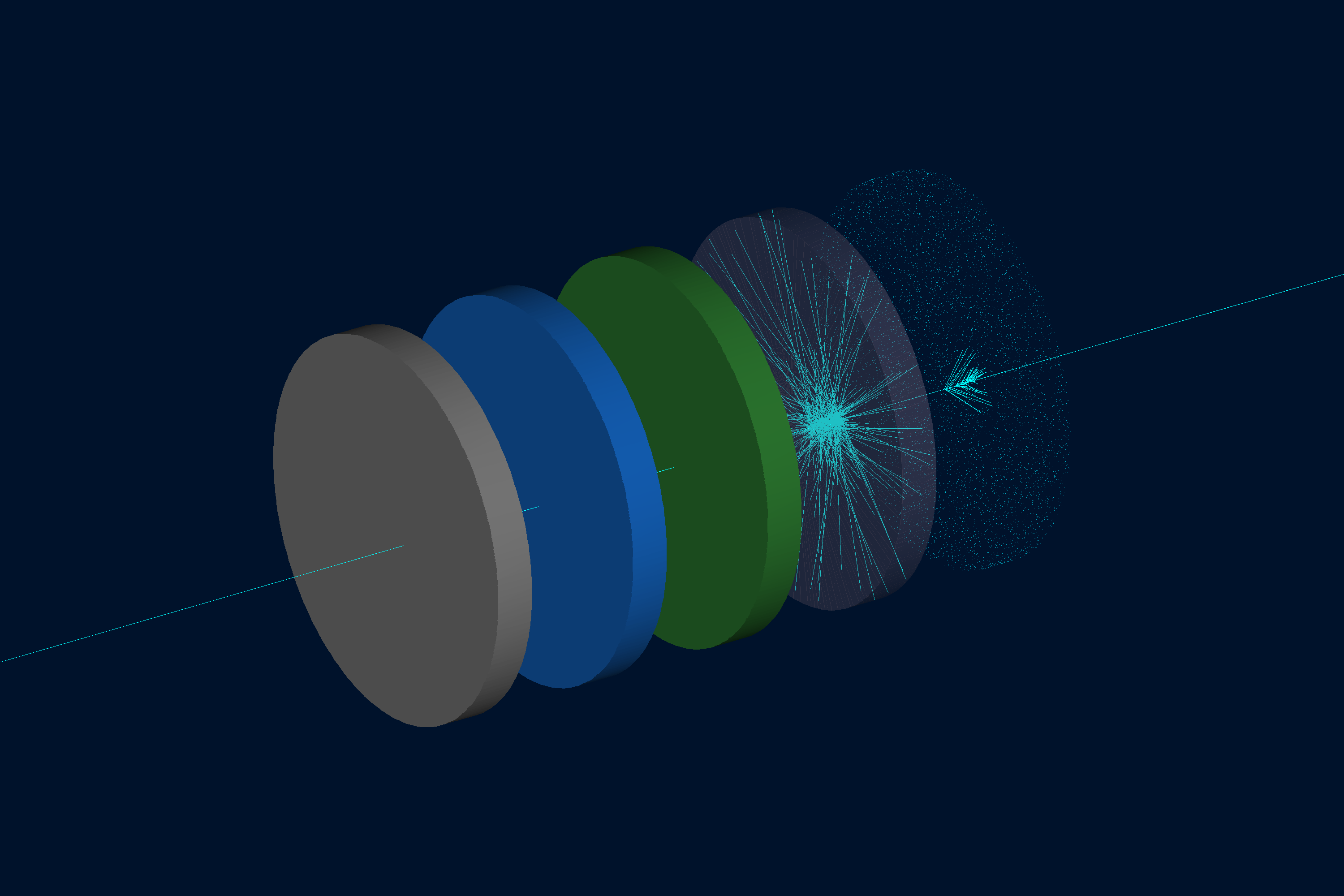
ワールド(root という名前のボックス)には、z 軸に沿って配置された 5 本の同一形状のチューブが含まれています。 すべてのチューブは同じ形状です: 直径 10 cm、厚さ 1 cm、z = 0 から始まり、互いに 3 cm の間隔を空けています。 異なるのは色とマテリアルの定義だけです:
| チューブ | ボリューム名 | マテリアル | 定義方法 |
|---|---|---|---|
| 1 | tube_carbon | G4_C | Geant4 組み込み(グラファイト) |
| 2 | tube_water | custom_water | 分子組成(H2O) |
| 3 | tube_mixture | air_water_mixture | 質量分率(空気 80%、水 20%) |
| 4 | tube_scintillator | my_scintillator | シンチレーション特性を持つ NaI に似た材料 |
| 5 | tube_optical | optical_glass | 屈折率を持つ SiO2 |
インタラクティブビューア:
マテリアルの定義
チューブ 1 — Geant4 組み込みマテリアル
最も単純なケース:
Geant4 マテリアルデータベース
の名前を gvolume.material に直接割り当てます:
tube1.material = "G4_C"
GMaterial オブジェクトは不要です。GEMC は実行時に名前を解決します。
チューブ 2 — 分子組成
GMaterial と addNAtoms を使って、化学式に含まれる元素と各元素の原子数を指定します:
water = GMaterial("custom_water")
water.description = "Water defined by molecular composition (H2O)"
water.density = 1.0          # g/cm3
water.addNAtoms("H", 2)
water.addNAtoms("O", 1)
water.publish(cfg)
原子の総数は 1 より大きくなければなりません。
チューブ 3 — 質量分率
addMaterialWithFractionalMass を使って、既存のマテリアルを質量分率で混合します。
分率の合計はちょうど 1 にならなければなりません:
mixture = GMaterial("air_water_mixture")
mixture.description = "80% air / 20% water mixture"
mixture.density = 0.9601     # g/cm3
mixture.addMaterialWithFractionalMass("G4_AIR",   0.80)
mixture.addMaterialWithFractionalMass("G4_WATER", 0.20)
mixture.publish(cfg)
チューブ 4 — シンチレーション特性
photonEnergy とシンチレーション関連のフィールドを設定して、光学光子の放出を有効にします。
エネルギー依存のすべての量は、photonEnergy と同じ数のエントリを持つ必要があります:
scintillator = GMaterial("my_scintillator")
scintillator.density = 3.67   # g/cm3
scintillator.addNAtoms("Na", 1)
scintillator.addNAtoms("I",  1)
scintillator.photonEnergy       = "2.0*eV 2.5*eV 3.0*eV 3.5*eV 4.0*eV"
scintillator.fastcomponent      = "1.0 0.9 0.8 0.7 0.6"
scintillator.slowcomponent      = "0.5 0.4 0.3 0.2 0.1"
scintillator.scintillationyield = 38000   # photons/MeV
scintillator.resolutionscale    = 1.0
scintillator.fasttimeconstant   = 6       # ns
scintillator.slowtimeconstant   = 88      # ns
scintillator.yieldratio         = 0.8
scintillator.birksConstant      = 0.00152
scintillator.publish(cfg)
チューブ 5 — 屈折率(チェレンコフ)
photonEnergy、indexOfRefraction、および必要に応じて absorptionLength を設定して、
マテリアル内でのチェレンコフ放射を有効にします。これは
チェレンコフの例で使われているアプローチと同じです:
optical_glass = GMaterial("optical_glass")
optical_glass.density = 2.5   # g/cm3
optical_glass.addNAtoms("Si", 1)
optical_glass.addNAtoms("O",  2)
optical_glass.photonEnergy      = "2.0*eV 3.0*eV 4.0*eV 5.0*eV"
optical_glass.indexOfRefraction = "1.458 1.466 1.476 1.490"
optical_glass.absorptionLength  = "3*m 3*m 3*m 3*m"
optical_glass.publish(cfg)
物理リスト
シンチレーションとチェレンコフ放射による光学光子が追跡されるように、YAML ファイルで
FTFP_BERT + G4OpticalPhysics が選択されています。
phys_list: FTFP_BERT + G4OpticalPhysics
phys_list
The physics list can be selected using the option
gemc -phys_list <value>where
<value>can be a combination of the Geant4 physics constructors separated by the+sign. For examplegemc -phys_list="FTFP_BERT + G4NeutronCrossSectionXS"To see a list of the available Geant4 constructors:
gemc -showPhysics
ジェネレータ
粒子の運動学的条件は YAML ファイルで定義されています:
gparticle:
  - name: proton
    p: 2000*MeV
    vz: -2*cm
    delta_vx: 0.1*cm
    delta_vy: 0.1*cm
    multiplicity: 1
詳細については 内部ジェネレータのドキュメント も参照してください。
使い方
検出器の構築
./materials.py
詳細については ジオメトリの構築 も参照してください。
GEMC の実行
gemc materials.yaml -n=10
シーンの注釈や装飾は annotations.yaml に保存されています。すっきりとした表示にするにはメインの YAML
ファイルだけで実行し、ラベルとスケールの装飾を含めるには両方の YAML ファイルを渡します:
gemc materials.yaml -n=10
gemc materials.yaml annotations.yaml -n=10
インタラクティブに実行するには -gui を追加します。
イベントの実行
出力
YAML ファイルでは 2 つの出力ストリームが設定されています:
gstreamer:
  - format: csv
    filename: material
詳細については 出力のドキュメント も参照してください。